Glake
Get in touch
Development · Content

AI video publishing on autopilot

The creator sends a finished video to a Telegram bot, and the system transcribes it, writes the title, description, and hashtags, and publishes it to several platforms on a schedule. No manual uploads, no formatting posts by hand

Global Import
Global Import · one action to publish a video on four platforms
Discuss a similar projectAll case studies
AI video publishing on autopilot
4
platforms: TikTok, YouTube, Telegram, and VK
3
daily publishing slots: 5, 7, and 8 p.m.
1
action: send the video to the bot
30–40
minutes saved per video
01 · The challenge

What the client needed

Global Import is a wholesale company based in Krasnoyarsk, Russia, that works with a large roster of UGC creators. These bloggers shoot video reviews daily and hand them off to be published on several platforms at once — 10+ pieces of content every day.

Every platform has its own rules and formats. For a video to get seen, it needs a title, a description, and hashtags — and it has to go out at the right time. With this many creators and videos, publishing turns into a job of its own.

Before, creators uploaded each video to every platform by hand, one by one, writing a fresh description every time. That repetitive work ate into time for shooting and editing.

The goal: creators do one thing — send the finished video to the bot — and everything else happens automatically.

What stood in the way
Manual uploads
Publishing one video took 30–40 minutes because it had to be uploaded to each platform separately.
Descriptions from scratch
Every video needed a title, description, and hashtags written from scratch.
Manual scheduling
Creators picked release times themselves, and with lots of videos in the pipeline, the schedule was hard to keep track of.
02 · The solution

What we built

01

One-step upload

Creators just send the finished video to the Telegram bot, and it’s posted to every platform automatically.

02

Auto-written copy

Titles, descriptions, and hashtags are generated from the video’s transcript in the creator’s own style, which is configured once.

03

No scheduling clashes

Videos go out in the 5, 7, and 8 p.m. Moscow time slots and don’t overlap: each time is recorded in the schedule spreadsheet.

04

Publishing report

Once a video is live, a report lands in Telegram, so the creator can see right away that the post went through. Access to VK (Russia’s largest social network) refreshes automatically, so there’s no need to re-authorize.

03 · Demo

How one video goes live

Here’s the path of one video, step by step: from a message to the bot to going live on every platform.

Step 1

Send to the bot

The creator sends a video to the Telegram bot. That instantly triggers the workflow: the system picks up the file and starts processing. There’s no start button to press.

Step 2

Audio to text

The audio track is pulled from the video, and a speech recognition model transcribes it. The transcript is the basis for the copy: the AI model works from what the creator actually says, not generic phrasing.
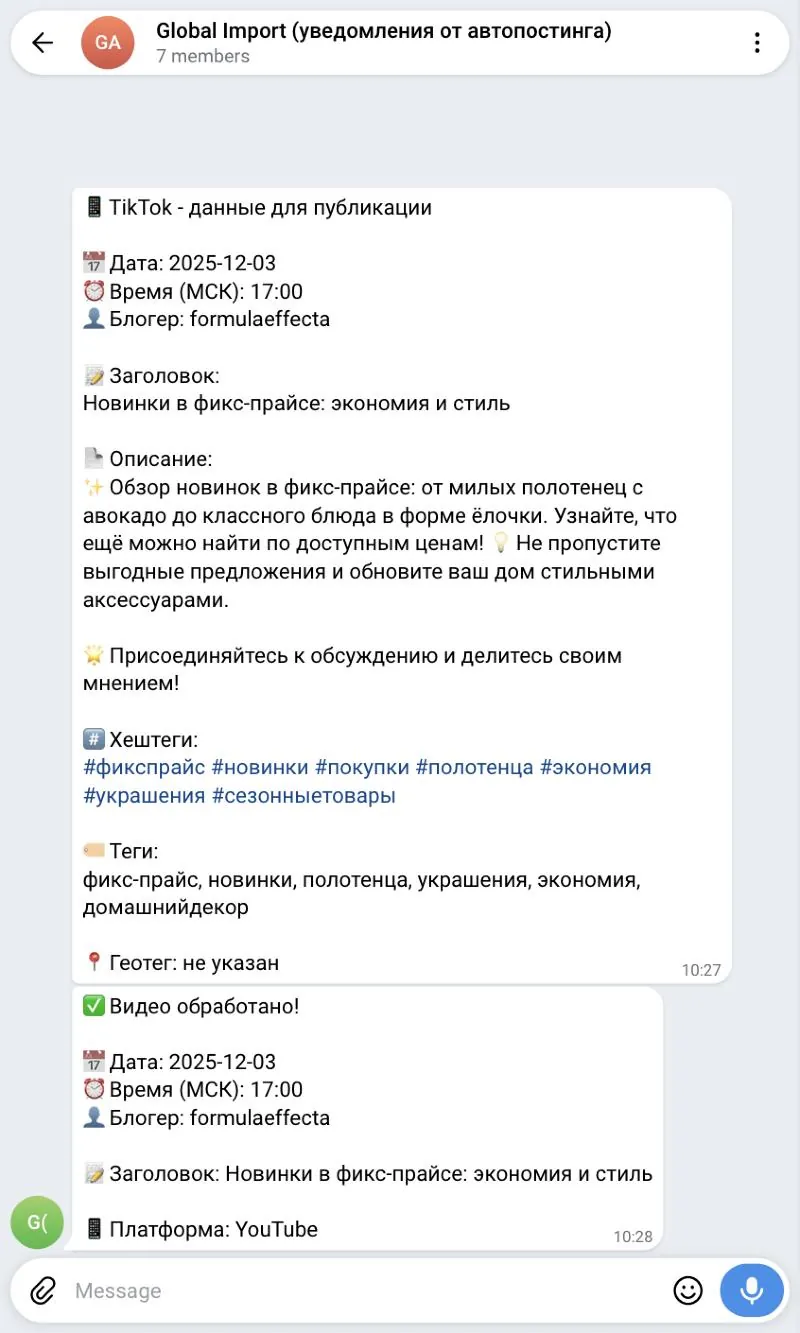
Post details: title, description, hashtags, and release time
Step 3

Title, description, hashtags

From the transcript, the AI model writes the title, description, and hashtags. Writing rules live in the settings and are tailored to each creator: tone, length, and must-have elements. If the video mentions a product, a dedicated rule kicks in and adds a marketplace link to the description.
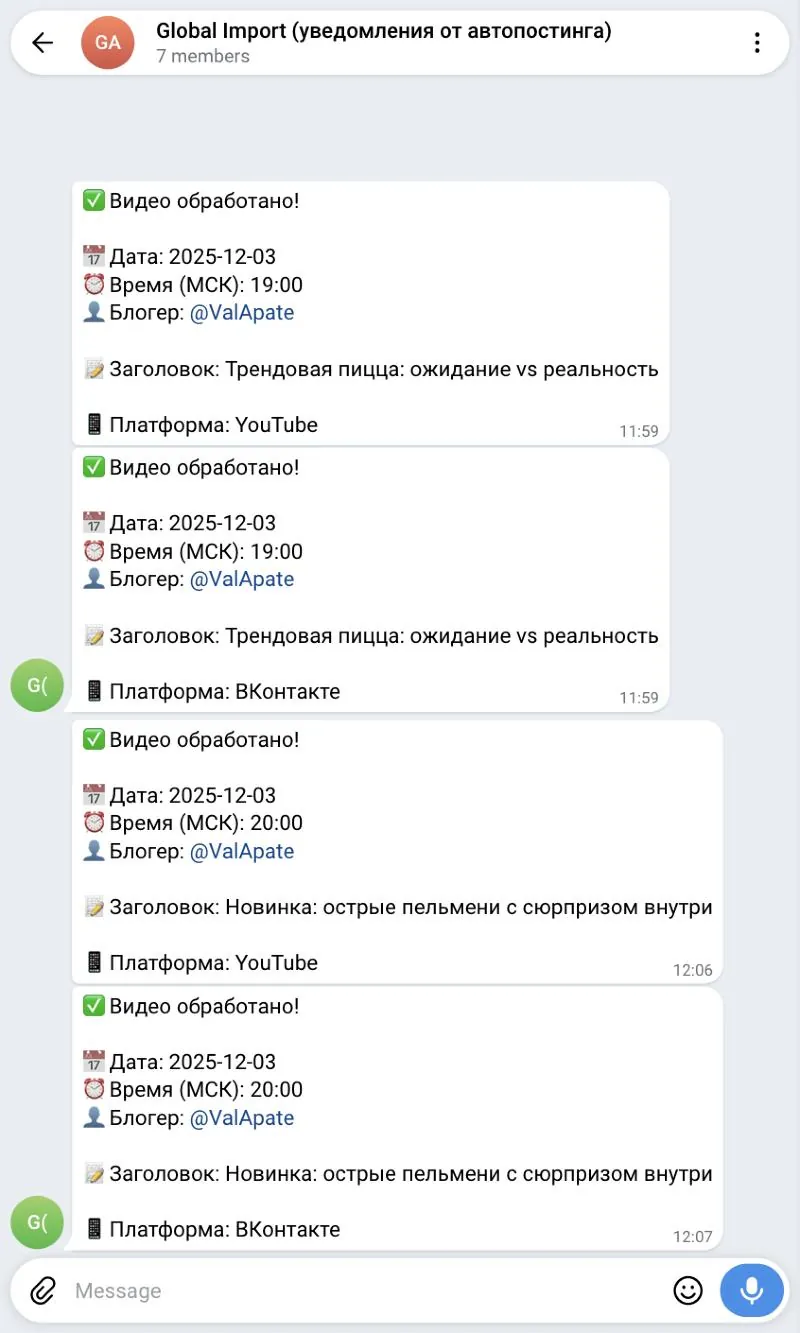
Telegram reports: time, creator, title, and platform
Step 4

Schedule and post

The system finds the next open slot in the schedule spreadsheet — today, or tomorrow if today’s slots are full — and books it. At the scheduled time, the video goes out to TikTok and YouTube through a publishing service and to Telegram through the bot, and it’s uploaded to VK through the API as a community post.

04 · Tech stack

Stack and approach

n8n
The workflow builder: the whole process is assembled from its blocks
Telegram bot and Google Sheets
The bot receives videos, posts them to Telegram, and sends reports; the spreadsheet holds the slot schedule
Speech recognition
Transcribes what’s said in the video
LLM
Writes titles, descriptions, and hashtags
Upload-Post and VK API
Publishing to TikTok, YouTube, and VK

Also used: FFmpeg — pulls the audio from the video

How it works

Creator · Telegram bot
Video sent to the bot
Telegram
Workflow trigger
n8n, on new video
Video processing · n8n
Audio extraction
FFmpeg
Transcription
speech recognition
Title, description, hashtags
LLM, per-creator rules
Schedule · Google Sheets
Slot spreadsheet
5, 7, 8 p.m. Moscow time
Next open slot
today or tomorrow, logged in the sheet
Posting and reporting
TikTok and YouTube
Upload-Post
VK
API, community post
Telegram
posted by the bot
Report to the creator
Telegram Bot
VK access refresh
separate workflow, every 50 minutes
05 · Results

What the client got

Creators now have just one job: send the video to the bot. Everything else runs automatically.

4
platforms a video reaches in one action
3
daily publishing slots, no clashes
30–40
minutes saved per video
Titles, descriptions, and hashtags generated from the video transcript
The schedule lives in a slot spreadsheet
Publishing reports arrive in Telegram
Reusable for a new creator: just change the settings
06 · For your business

Who else this works for

A similar setup works for anyone who regularly produces short videos and posts them across several platforms.

Creators and experts
Posting videos to several platforms at once, with titles and descriptions drawn from the video and releases on a schedule
Online schools
Webinar and lesson clips with ready-made descriptions, posted at times that suit the audience
Agencies
Running multiple clients’ accounts from one template, each with its own schedule spreadsheet and community
Online stores
Video reviews with product links added to the description automatically, published on a schedule
Any company posting video regularly
Scheduled posting to several platforms — just send the video to the bot

We build solutions like this around your needs: turnkey AI products, AI agents and automation, integrations, and data.

Our services
Get in touch

Want results like these?

Tell us about your project — we’ll talk it through and show you how to make this work for your business

We’ll set up a short call
We’ll scope your task and estimate it within 1 business day
You’ll get a clear implementation plan and transparent pricing
Alexander Yarygin
Founder, Glake
Replies personally
What can we help with?
Select one or more
or
Chat on LinkedIn

More case studies

AI monitoring of retail chain mentions
DevelopmentRetail

AI monitoring of retail chain mentions

Tracks posts about 15+ retail chains: topic, sentiment, virality score, and Telegram alerts

Global Import
AI assistant for social media content
DevelopmentFinTech

AI assistant for social media content

Text, image, and video generation with auto-posting to social media

Strong Finance
AI operations monitoring agent
DevelopmentMarketplaces

AI operations monitoring agent

Pulls Wildberries metrics, computes KPIs, and flags sales and ad anomalies

MPstats
All case studies